CanEveryoneRead this?
Passa checks your designs and live websites against WCAG, shows you exactly how to fix each issue in the tool you use (code, WordPress, Webflow or Wix), and turns the results into reports your clients can read.
Contrast meter
Try it
Large text looks like this
Body text reads like this
3.08
Contrast : 1
What this means
Readable when large. Too faint for body text.
Contrast ratio 3.08 to 1. Readable when large. Too faint for body text.
- AA body Fail
- AA large Pass
- AAA body Fail
Try:
Nearest passing shade
#6C768D gives 4.55:1
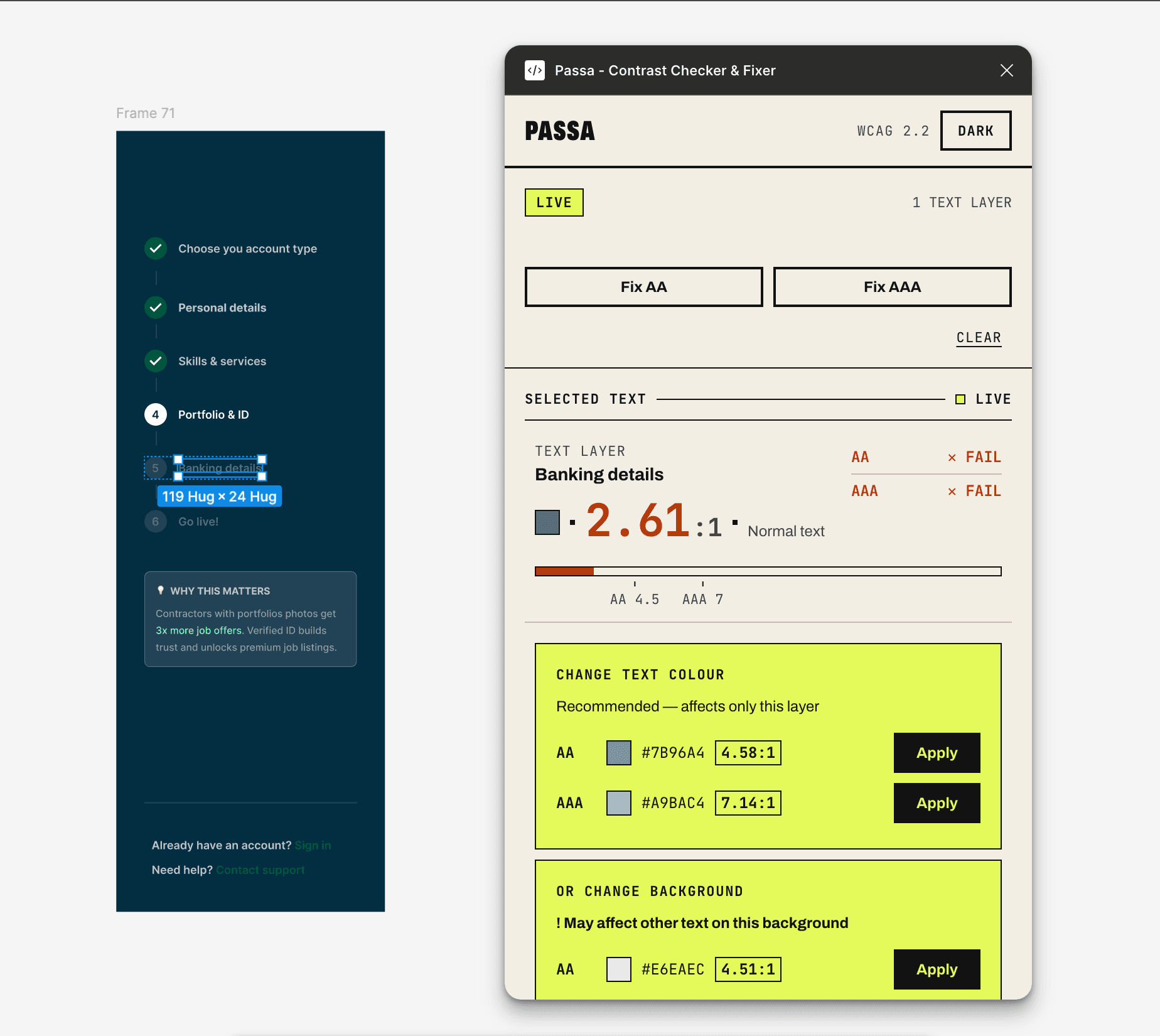
Fix contrast without leaving Figma
Check any text layer, scan a whole page, and fix every failure in one click, right where you design.
- Check any layer as you design
- Fix failures in one click, or all at once
- Draw an audit report onto your canvas
More checks coming to the plugin: touch targets, colour-blind preview, focus states.
Four ways in
Contrast is where most products fail first, so it's where Passa starts. Every route lands in the same project, with the same history, fixes and reports.
Coming soonFix guides for code, WordPress, Webflow and Wix.
Real fixes in your site, no overlays.
Live websites
Paste a URL.
Free · 1 pageComing soonFigma
Paste a link to a file or frame.
FreeComing soonScreenshots
Designs from any tool.
ProComing soonFigma plugin
Check and fix contrast while you design.
FreeLive now
What Passa checks
Planned for launch
Colour
- Text contrastWCAG 1.4.3
- Icon and UI contrastWCAG 1.4.11
- Colour used aloneWCAG 1.4.1
Content
- Alt textWCAG 1.1.1
- Form labelsWCAG 1.3.1
- Link and button namesWCAG 2.4.4
Structure
- HeadingsWCAG 1.3.1
- Page languageWCAG 3.1.1
Interaction
- Touch targetsWCAG 2.5.8
- Focus statesWCAG 2.4.7
The other halfComing soon · Pro
Some checks need a human
Automated tools only catch part of WCAG. Passa walks you through the rest (keyboard navigation, screen reader flow, meaningful alt text) as a guided checklist, and adds your answers to the report.
- Keyboard onlyWCAG 2.1.1
- Focus orderWCAG 2.4.3
- Screen readerWCAG 4.1.2
- Alt text qualityWCAG 1.1.1
Fix the whole palette, not one pair
Add your brand colours. Passa finds every combination that fails and suggests the smallest changes that keep the whole palette on brand.
Before
Navy: #22305E
Coral: #FF6F59
Teal: #2BB3A8
Mustard: #E8B730
Light grey: #E4E4E1
White: #FFFFFF
After
Navy: #1B2650
Coral: #D9503C
Teal: #1D8079
Mustard: #A87C10
Light grey: #EEEEEB
White: #FFFFFF
Before: 9 of 15 pairs fail · After: 15 of 15 pass
Example palette, for illustration
Proof your clients can read
The European Accessibility Act means clients and stakeholders are asking: is our product accessible? Passa gives you the evidence.
PDF reports with your logo
Every issue, the WCAG rule it breaks and the fix.
Team
Share links
A private link your client or stakeholder opens without an account.
Team
Audit history
Show what improved between audits.
Pro
Accessibility statement
Generate the public statement your client needs to publish.
Team
Launch pricing
Early access · 3 months Pro free
Free
£0
- Contrast meter
- Figma plugin (current features free forever)
- 1 project
- 3 single-page scans a month
Pro · For designers & developers
£15 per month
or £144 per year
- Unlimited projects
- Full-site WCAG scans, up to 50 pages
- Palette repair
- PDF reports and audit history
- Guided manual checklist
Team · For agencies & product teams
£59 per month
or £590 per year
- Everything in Pro
- 5 seats
- Your logo on reports
- Client share links
- Accessibility statement generator
Early access
Be first to pass
Passa is in development. Join early access, help shape what we build, and get 3 months of Pro free at launch.